
Fearless - NJ OOI

Background
The NJ State Office of Innovation partners with agencies to simplify small business operations. As the Tiger Team’s lead content strategist, I was tasked to identify NJ Motor Vehicle Commission permits required for small businesses for operation.
This required in-depth combing through the NJ MVC’s website, which unfortunately contained a lot of outdated information in some cases, and missing information in others.
Further, the NJ OOI’s guidelines for CMS publishing (Netlify in this case) was not particularly straightforward. It lacked a robust end-to-end publishing process, leading to extended workflows and confusion amongst teams and leadership.
This led to a later initiative to create a permit planning template to improve content strategy workflows.
⛔ Problem
For users
Without access to needed NJ MVC permit requirements, small businesses owners risked regulation and legal action being taken against their businesses.
For the business
Without a robust process for identifying and publishing necessary NJ MVC permit requirements, the NJ OOI risked creating knowledge gaps and extra work for users, leading to eroded trust and lack of retention over time.
✅ Solution
To tackle this project, I did the following:
-
Audited 42 MVC-related permits and prioritized 9 of them based on volume and business necessity
-
Partnered with SMEs to implement accurate information for high-volume permits (CDL, Titling & Registration, IRP, IFTA, Dealership Licenses)
-
Designed decision-tree flows and collaborated with design to implement Commercial Driver License (CDL) screen variants to reduce user overwhelm
-
Developed ordering logic for interdependent permits (e.g., IRP/IFTA before vehicle registration)
-
Created a template for permit task screen planning to accelerate workflows and reduce implementation errors for all NJ OOI content strategists
Roles and scope
👤 My roles
-
Content Designer
-
Content Strategist
-
UX Researcher
-
Content Manager
👥 Collaborated with
-
Product Managers
-
NJ OOI leadership
-
Designers
-
NJ MVC SMEs
🗓️ Duration
-
Jan 2025–Aug 2025 (8 months)
Discovery and planning
NJ MVC permit audit
Early on in my contract, I was made aware of an Airtable spreadsheet that tracked annual submissions of all permits required by business owners to stay in compliance with the state of New Jersey.
42 of these permits were identified as being specific to the NJ MVC. Using this, I created my own spreadsheet to track the following:
-
The permit itself
-
Annual volume of submissions (important for workflow prioritization)
-
Whether or not it applies to small businesses (an important distinction, since the NJ OOI doesn’t service enterprise business owners)
Prioritization was made using a combination of annual number of submissions and necessity of the permit for small businesses. This allowed me to narrow our number of permits to 12.

A content strategist who previously worked on this team had also identified a list of NJ MVC-related permit screens that were already published in Netlify, but still required an audit comparison of the information provided with what was on the NJ MVC’s website to ensure accuracy for our user base.
Using this list and my spreadsheet, I further narrowed my scope by answering the following:
-
Does the permit have an existing screen?
-
If yes, is the existing screen sufficient?
If the answer to either question was “No,” it was prioritized for the audit. After doing this, the number of permits decreased from 12 to 9.

Looking at this table, I then identified:
-
4 existing permit screens that needed to be researched and redesigned for accuracy, then republished to Netlify.
-
5 permits that needed to be created and published from scratch.
Permits to be redesigned
-
Bus inspection
-
Commercial Driver’s License (CDL)
-
International Registration Plan (IRP)
-
Certificate of Public Convenience and Necessity (CPCN)
Permits to be designed
-
Vehicle title and registrations
-
MVC EIN
-
Car dealership license
-
International Fuel Tax Agreement (IFTA)
-
Emergency Lights Permit - Amber
Using the same spreadsheet, I added columns specifying issues with individual screens that needed redesign.

Ultimately, I presented the following prioritized list of permits, and my team and I worked through them in order.

Content strategy and approach
Creating an end-to-end content publishing process
When I was onboarded to the NJ OOI content team, there was already a fairly robust process for writing permits, which can be seen below.
.png)
This was immensely helpful for the most part, but there were individual steps that I found needed further refinement to make my own workflow more effective and efficient.
Specifically, I found that steps 1 and 6 could be covered via a set of LLM prompts, which I had been using to help me research and answer core components business owners needed to understand about individual permits before applying for them.
.png)
GenAI prompt engineering
Depending on the availability of information, these questions could be fed into an LLM and then checked for accuracy by scouring the NJ MVC’s website.

As mentioned previously, sometimes LLMs would not give helpful responses, since many permits had incredibly niche requirements that weren’t always available on the NJ MVC’s website or elsewhere.
For example:

Ultimately, for my process, I ended up using my questions to:
-
Get LLM-generated information, to improve workflow efficiency.
-
Compare said info to any available information on the NJ MVC website, to check for accuracy
-
Present and discuss with our SMEs during bi-weekly meetings in the event that information was conflicting or not available on the NJ MVC’s website.

Identifying Roadmap, Essential and Non-essential permit tasks
To avoid over-complicating user onboarding, we only included permit tasks to industry roadmaps if 100% necessary, meaning the user cannot open and operate their business without first getting it.
However, sometimes there were cases where a user MIGHT need a permit to operate their business, and without additional information, we couldn't determine this for certain.
For example, operating commercial vehicles outside of New Jersey (interstate travel) is an essential in the Trucking industry, whereas it’s common for Moving Companies, but not necessarily a given.
Such cases helped us designate between adding a task as part of an industry roadmap vs adding it as an essential or non-essential task.
Onboarding and non-essential tasks typically involve answering "Yes" to a question surrounding the permit's regulations. For example, “Will you be moving goods across state lines?” is used for interstate travel-related permits.
Since essential tasks imply a greater frequency of need, this question is placed directly within the user’s onboarding flow upon selecting a relevant industry, as shown below:

Non-essential permits, on the other hand, are less important for the industry. The user can typically engage in the activity and seek out its corresponding license at any point during their business formation, or once up and running.
As such, questions tied to non-essential permits are added to the user’s business profile, as shown below:

Since this was a core piece of each permit/license creation and there was no process for publishing, I created a GenAI-driven prompt that involved analyzing all 62 of the NJ OOI's industries to determine which of the following 3 categories it falls under:
Roadmap
Business requires the permit for operation. No exceptions.
Essential
Business has a 50/50 chance of requiring the permit for operation.
Non-essential
Requires the permit infrequently, but there is still a chance.

The following demos show how non-essential questions are implemented in Netlify, and how they appear to users on the site:
Identifying Anytime Action permit tasks
Most of our users were small business owners with businesses not yet up and running. However others had already established a presence within NJ and were looking for a platform to manage and maintain their needs.
For the latter users, permit task screens were treated as something they could do “anytime,” and were thus referred to as “Anytime Actions.”
The process for identifying which users needed to view these permits was slightly different than for that of essential/non-essential identification, as our already up and running users had to select from a list of sectors, rather than industries.

Anytime Action screens have all the same content as regular task screens, though each has to be added manually.
Here’s a video of what this process looks like.
My process for identifying whether a permit/license needs a corresponding Anytime Action was essentially the same as how I identified Roadmap/Essential/Non-essential questions.
The only difference is that the reasoning is provided for broad sectors, rather than specific industries.

Pre-filled for our IRP Anytime Action task screen

Filled for Netlify implementation
Identifying and ordering Roadmap tasks
When permits were determined to be important enough to be part of a user’s roadmap, this meant that it would show up as a task to complete after the user had onboarded.
As seen below, most of our permits, due to how business formation typically works, would go under step 4, “Before Opening Your Site in New Jersey”

The order that these tasks show up is important. Sometimes, a user needs to complete one task as part of the eligibility criteria for another.
For example, users requiring both International Registration Plan (IRP) and International Fuel Tax Agreement (IFTA) registration, would need to do so before attempting to register a vehicle.

Further complicating this is the fact that tasks and their ordering could be tied to Essential/Non-essential questions in the CMS, in a section that is separate from the corresponding industry(ies).
This was the case for our Moving Company industry, shown below.

Because of this onboarding question, 4 tasks are tied to and ordered separately from the roadmap industry tasks, shown below on the left and right respectively.
Said tasks are also ordered by numbered “weights,” rather than a more user-friendly “drag and drop” mechanism, as Netlify does not allow for this.
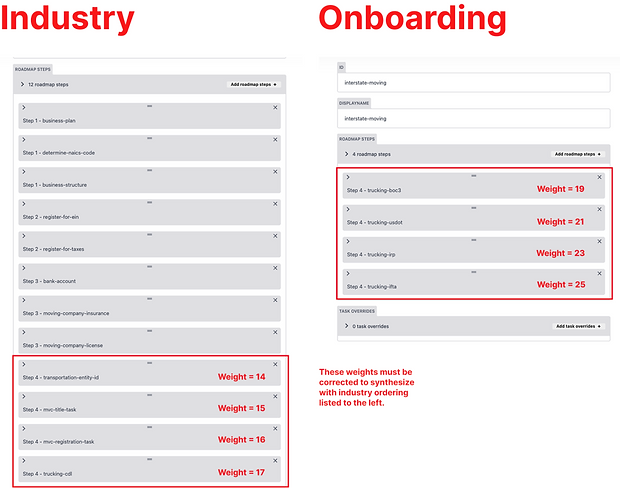
To sort out this issue, I first listed each task and corresponding business formation step in a separate doc, ordering all in accordance to what the user needs to do before they are eligible to complete the next task.

Now that the logical ordering is complete, weights (in the form of numbers) need to be chosen that allow for all tasks to combine in succession if the user answers “Yes” to the onboarding question: “Do you plan to move goods across state lines?”
We’ll do this by starting with the number 14.
14. Register Your Vehicle with the U.S. Department of Transportation
15. File Your Blanket of Coverage (BOC-3)
16. Get Your Motor Vehicle Commission EIN
17. Get a Title for Your Business Vehicle(s)
18. Register Your Vehicle(s) Under the International Registration Plan (IRP)
19. Get Your International Fuel Tax Agreement (IFTA) License and Decals
20. Register Your Business-Owned Vehicle(s) with the NJ MVC
21. Make Sure You or Your Drivers Have a Commercial Drivers License (CDL)
For the record, I chose 14 completely at random. Why? Because the starting number is irrelevant to ordering in Netlify! Every task that follows simply needs to be larger than the previous to show up in descending order.
On the back end, this ordering is shown as follows:

Here's a demo of this process on the backend.
Once these changes have been published to the content (test) site, we can check and make sure the new ordering is showing up correctly.
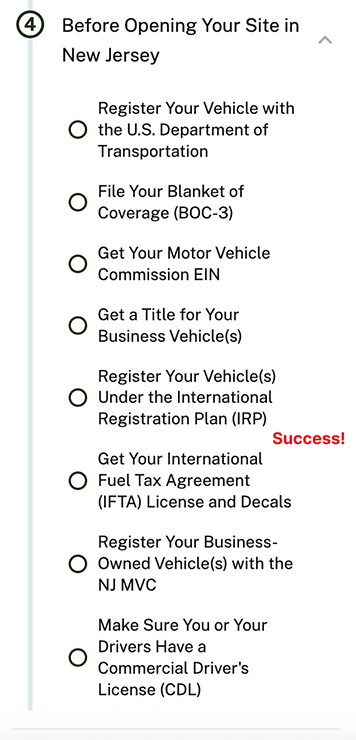
Dev will then merge the content branch to the main one, and the changes will be published to the live site.
Designing beyond CMS capabilities (Commercial Driver’s License [CDL])
Some of our licenses and permits required a lot of forms, steps, or information from the user to determine what specifically they needed. One of these that I worked on was the Commercial Driver’s License (CDL).
There are several different CDL variations, which include both a Class (A, B or C) and Endorsements (most commonly T, N, H, X, P and S).
Below is a chart outlining the 8 most common CDL types (not including Class C alone) sought by our users:
.png)
Knowing that users are typically seeking 1 of 8 CDLs made my job easier as a content designer and strategist. However, given that users aren’t expected to spend much time on each individual license and corresponding task screen, there was still a need to simplify this information so that they weren't overwhelmed at first glance.

The original CDL task screen, which had way too many words
I figured it would be easier for the user if we determined which CDL they needed before showing them a task screen. These new task screens would have information that ONLY pertained to that specific CDL.
To figure out how to display these pre-task screen questions, I made a variety of different decision trees. One example is shown below:

This first attempt tried to determine the user's CDL by first identifying Class, then Endorsement(s).
Ultimately, however, this logic didn't quite work as some CDL combinations don't exist (ex: Class C CDL with no Endorsement)

CDL Class explanations, pulled directly from nj.gov/mvc
The final decision tree asked the user questions that allowed us to funnel them into 1 of 4 categories of CDL types: Trailers and Combo Vehicles, Cargo and Tank Vehicles, Passenger Vehicles, or School Bus, each with a corresponding task screen.
You can view the final decision tree here.
Instead of two task screens, the user now has an option to choose both, or one of the following:


Passenger transport CDL pre-task screen questionnaire

Passenger transport CDL: 1 of 4 screen possibilities
CDL task flow - Before
CDL task flow - After
Please note that the Hauling and Towing screens had not yet been implemented by devs at the time of these recordings.
Impact and outcomes
Deliverables
🎨 4 redesigned NJ MVC permit tasks
-
Bus Inspection (initial)
-
Commercial Driver's License (CDL)
-
International Registration Plan (IRP)
-
Certificate of Public Convenience and Necessity (CPCN)
✨ 5 net-new NJ MVC permit tasks
-
MVC EIN
-
Vehicle title
-
Vehicle registration
-
International Fuel Tax Agreement (IFTA)
-
Car dealership license
📝 Permit task planning template, which included:
-
GenAI prompts and instructions for:
-
Researching permit requirements
-
Determining whether an industry or sector should be mapped to individual permits (“Essential/Non-Essential Questions” and “Anytime Actions”)
-
-
Instructions for documenting SME discussion/feedback
-
Instructions for documenting UX crit discussion/feedback
-
A markdown-based template for team members to fill in, easing the Netlify publishing process
-
Instructions for writing contextual information (Netlify feature)
-
Instructions for how to map permits to relevant industries and sectors (Netlify feature)
-
Instructions for how to determine whether a permit task is “Essential” or “Non-Essential” for onboarding users that have yet to open their business (Netlify feature)
-
Instructions for how to determine whether a permit task should be designated as an “Anytime Action” for businesses already up and running (Netlify feature)
-
Instructions for ordering permit task steps within individual industry roadmaps (Netlify feature)
-
Demo videos for each Netlify-specific section, since this publishing process was rather confusing and occasionally tedious
Metrics
-
My efforts in writing and researching NJ MVC permits assisted in streamlining small business set up by 30% for 200k+ users
-
Team members who used my license planning template reported a 25% acceleration of end-to-end workflows for individual permits
-
Team members who used my license planning template also reported a general decrease of roadmap permit task mapping and ordering errors as a result of following my instructions and demo videos
Final product artifacts
Planning doc template
SME discussion and feedback instructions

UX crit discussion and feedback instructions

Contextual information

GenAI prompts (for permit research and mapping permits to Roadmaps, Essential/Non-essential questions, and Anytime Actions)


Ordering permit task steps

Revised NJ MVC screens (before and after)
Bus inspection (initial)
This permit screen I audited for bus inspections did not specify whether the bus was a school bus or a commercial bus. This was problematic because the NJ MVC has two separate units for these bus types, and each unit has:
-
Different form requirements
-
Different contact information

Before
The original screen also only included forms required for school bus inspections, which we discovered after multiple interviews with an NJ MVC bus SME was actually step 2 of the process.
The first step was to set up an initial bus inspection with either the NJ MVC commercial or school bus unit, as shown in a portion of the updated screen below. After scheduling this phone call, the NJ MVC will tell you which forms to fill out in order to receive a passing certification, so there was actually no need on NJ OOI’s end to include links to any forms.

After
Commercial Driver’s License (CDL)
This permit screen for CDLs did not offer the ability for the user to determine which Class and Endorsement type they needed for their specific vehicle, even though it was fully possible to determine this based on whether:
-
The user plans to operate a transportation vehicle for passengers
-
The user plans to operate a vehicle for the purpose of hauling and towing cargo
This resulted in a confusing list of requirements that were difficult to comb through, increasing the likelihood of cognitive overload.

Before
The updated CDL screen was subsequently split into two, with options for hauling/towing vehicles and passenger transport vehicles. Each screen included a questionnaire to further identify which Class and Endorsement the user most likely needed.
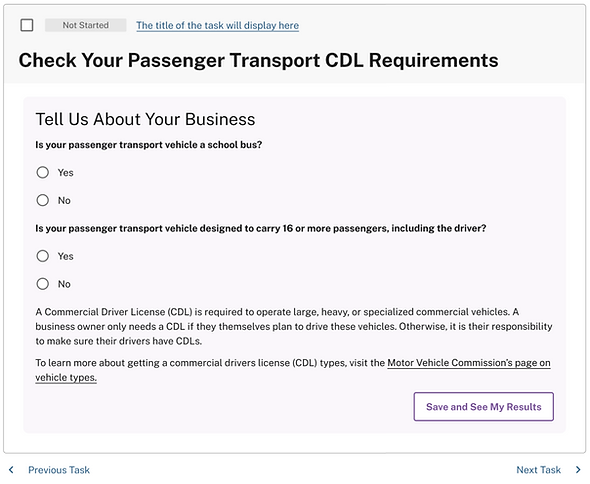

After